US FATCA & IDES
Form 8966, filed the way the IRS wants it
TRSuite produces schema-valid FATCA XML for Form 8966 and takes it all the way to the gateway: validate, sign, encrypt, package, transmit. One tool for the whole chain, for every IGA model.
- FATCA XML 2.0.1 and 2.0, the schema in force
- IGA Model 1, 2 and none including sponsors and intermediaries
- IDES end to end sign, encrypt, sender metadata
Global information reporting with TRSuite
With the Foreign Account Tax Compliance Act, the United States set out to make sure that accounts held abroad by US taxpayers can actually be taxed. FATCA is a unilateral set of US rules that applies worldwide: foreign financial institutions disclose information on US accounts to the IRS, either directly or through their own tax authority.
Preparing and filing those reports need not be an expensive, laborious task. TRSuite – which absorbed the IDEaSy software, proven across many reporting years – prepares properly formatted electronic files, ready for filing with every jurisdiction that follows the IRS schema. The IRS has required FATCA XML 2.0.1 since October 2025; TRSuite writes it, and still reads the 2.0 files you filed before.
All types of financial institution are supported, including sponsoring entities, territorial financial institutions and intermediaries. Under a Model 2 IGA the partner jurisdiction directs its FFIs to report US accounts to the IRS directly; under Model 1 the data goes through the local authority. Both routes, and the country-specific schemas and portals along them, are covered.
The IDES process, in a few clicks
Sender metadata v1.3The International Data Exchange Service is where financial institutions and host country tax authorities hand FATCA data to the United States. Preparing a valid transmission archive is fiddly; this is the part TRSuite automates completely.

What the FATCA module does
Unlimited GIINsEvery report type
Account holder reports, pool reports and nil reports – and, for anything already filed, the void, amended and corrected variants with the document references the IRS needs to match them up.
Capture and import
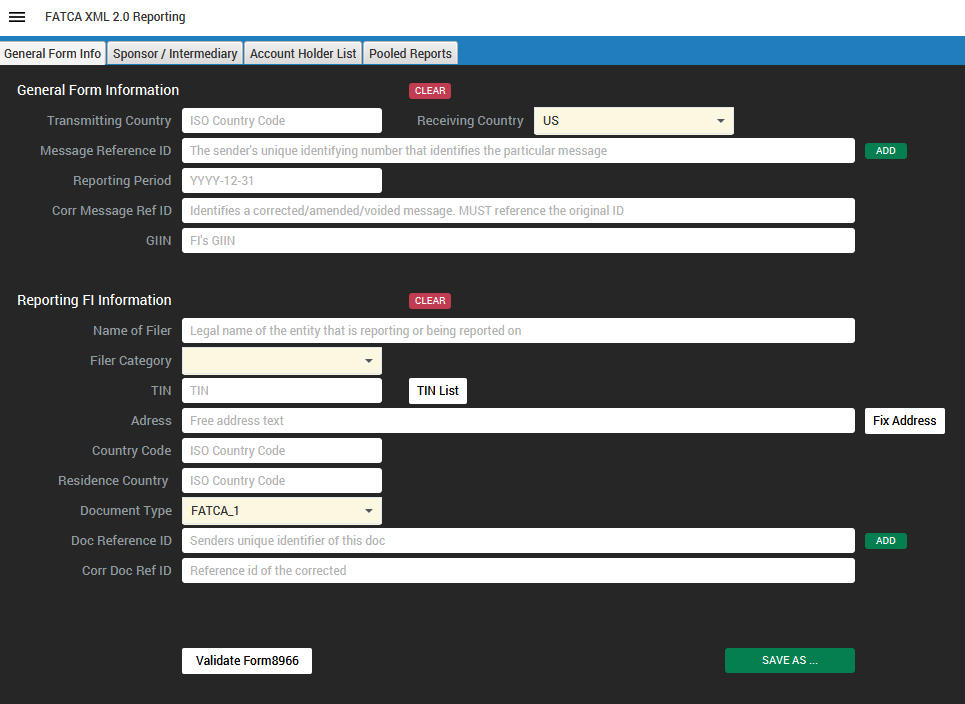
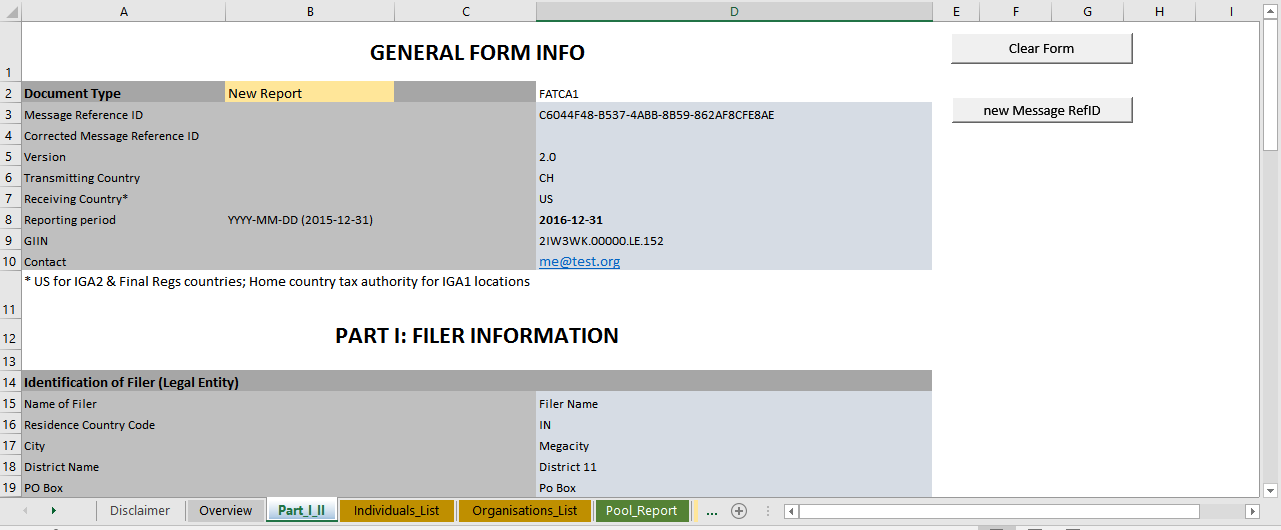
Type the data in, import an existing FATCA XML file, or collect it in the supplied Excel workbooks – basic, nil report and multiple reporting FI – each with a data entry form and a “Check data” button.
Validate before you file
Reports are checked against the IRS schema and against the business rules: GIIN and TIN formats, mandatory fields, amounts and dates, substantial owner completeness, document reference conventions.
Sign, encrypt, transmit
Digitally sign and encrypt files for IDES or your host country tax authority and build a valid transmission archive. Where a jurisdiction offers its own upload facility, support is added as it becomes available.
Swiss SEI delivery
The Swiss module builds the information packages the FTA expects, validates them against the rules of the current ESTV user guide, and delivers against the FATCA schema in force at delivery time.
Documentation for your file
Produce a PDF of what was reported and of what was transmitted, so the reporting run is documented without exporting the XML to someone else’s tool.
Swiss group requests
Reporting under a Model 2 agreement leaves the non-consenting accounts to administrative assistance: when a group request arrives, the Swiss Federal Tax Administration expects an SEI-XML file and a FATCA XML file per account within ten days. The SEI module produces both.
CRS and CARF in the same tool
The OECD Common Reporting Standard and the Crypto-Asset Reporting Framework are modules of TRSuite as well – same application, same working style, same licence model, and a discount on every module you add to an existing licence.
Inside the application
A trial licence with the full functionality is available for ten days.


Pricing and licence
USD · valid from 1 January 2026All prices exclude VAT. Perpetual licence, one year of premium support and maintenance included.
| Users | FATCA / IDES | CRS | CARF |
|---|---|---|---|
| 1-3minimum licence | 1'269.- | 1'269.- | 1'269.- |
| 4-10* | 395.- | 395.- | 395.- |
| 11-20* | 299.- | 299.- | 299.- |
| 21-50* | 275.- | 275.- | 275.- |
| 50+* | 235.- | 235.- | 235.- |
| Corporateunlimited use within the company | 15'500.- | 15'500.- | 15'500.- |
| Libraryembedding into your own software | 7'500.- | 7'500.- | 7'500.- |
| Source codeone-off transfer | 24'900.- | 24'900.- | 24'900.- |
| Individualtailored scope | request quote | request quote | request quote |
Multi-module discount
FATCA, CRS and CARF are separate modules of the same application. Combine them and every further module comes at a reduced licence price.
- Second module−10%
- Third module−25%
- Fourth and every further module−40%
The discount applies to the licence price of each additional module, ordered for the same number of named users. Tell us which combination you need and we will quote it.
Renewal discount
Lock in today's price and stretch the budget: prepay several years of premium support and maintenance.
- Two-year prepaid renewal−3%
- Three-year prepaid renewal−5%
Discount on the annual maintenance fee. Renewals always run from the support expiry date.
Perpetual licence
Software licences and the use of the products do not expire. One year of premium support and maintenance is included with every new perpetual licence. Premium support covers all new releases, new features and product updates free of charge, plus professional email support.
Premium support and maintenance
The annual renewal costs 40% of the full regional price of a new licence at the time of renewal, for each product bought under a perpetual licence. Multi-year renewals lock in the current price at the discount shown above. A running support contract can be extended at any time within its term under the conditions then in force; renewals always start from the support expiry date.
Named user
Licences are counted by user, not by concurrent session: if five employees may use the system, five licences are needed. The minimum for TRSuite is three named users per module; from the fourth user on, every additional user is charged at the rate of the band that user falls into. Reporting financial institutions, GIINs and jurisdictions are unlimited.
One tool, several standards
FATCA, CRS and CARF are licensed as separate modules and run side by side in the same application, with the same working style and the same data entry and import routes. Adding a module to an existing licence earns the multi-module discount above; existing licences can be consolidated onto one renewal date.
Corporate
Unlimited use of the program throughout the organisation - typically the better choice from about 50 users onwards.
Try it before you buy it
A trial licence with the full functionality, valid for ten days, and free evaluation support while you use it. Build your upload package today.
Reference material
- Foreign Account Tax Compliance Act IRS – the FATCA home page
- FATCA XML schemas and business rules for Form 8966 IRS – schema packages and the rules behind them
- International Data Exchange Service IRS – IDES enrolment and user guide
- FATCA FAQs IRS – questions from filers, answered
- Release notes What changed in each version